Home Server Infrastructure
A note on scope: This document covers architecture and configuration. Anything that would expose credentials, private keys, or operational security details has been intentionally left out — those live in the encrypted local copies (SSH config,
~/.ssh/, rclone config, sudoers, WireGuard configs).
Network overview
Router: ASUS RT-AC3100 — xxx.xxx.xxx.xxx Network: xxx.xxx.xxx.0/24
| Device | IP | Role |
|---|---|---|
| host-a (Lenovo ThinkCentre SFF) | xxx.xxx.xxx.xxx | Primary Docker/media server |
| host-b (ThinkPad) | xxx.xxx.xxx.xxx | AI/compute, VM host |
| host-c (Windows 11 workstation) | — | Desktop, pCloud staging, VS Code remote client |
| host-d | — | Workstation / jump host (Ubuntu Desktop) |
| Mark’s phone | — | WiFi, Tailscale client |
DHCP reservations are set in the router for host-a and host-b so IPs stay stable across reboots and cable changes.
Remote access runs via Tailscale (installed on host-a and host-b) using each device’s 100.x.x.x address. Run tailscale ip -4 on a device to find its current address.
host-a — Primary Home Server
Hardware: Lenovo ThinkCentre SFF (migrated from an HP Pavilion laptop, March 2026) Hostname: host-a · OS: Ubuntu 22.04 LTS IP: xxx.xxx.xxx.xxx · User: xxxxx
Storage
| Device | Mount | Purpose |
|---|---|---|
| Internal SSD | / |
OS, Docker configs |
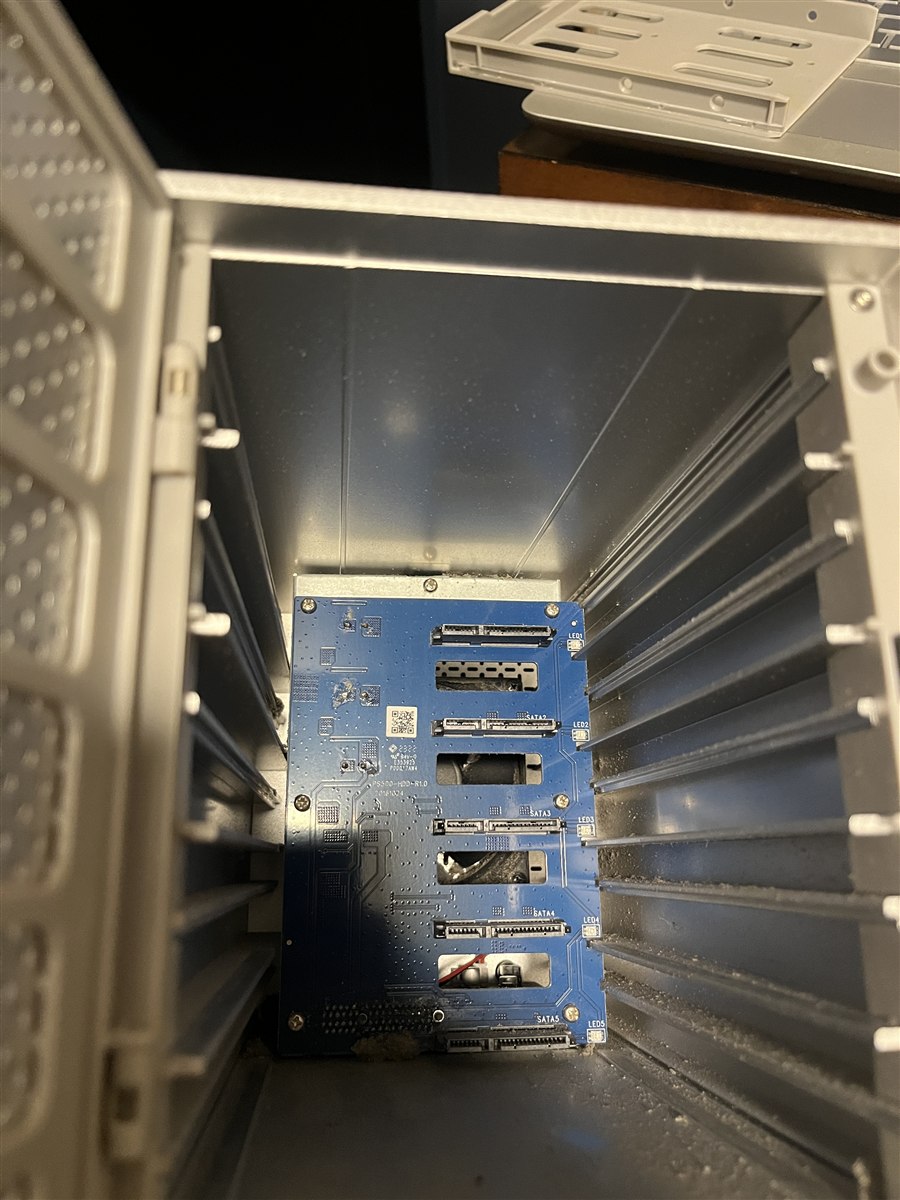
| RAID 5 array (5×4TB HGST, Yottamaster PS500 enclosure) | /mnt/raid-library |
Primary media library |
| pCloud (rclone FUSE) | /mnt/pcloud |
Cloud storage / cold archive |
RAID array details:
- Device:
/dev/md0, filesystem ext4 - UUID:
xxxxxxxx:xxxxxxxx:xxxxxxxx:xxxxxxxx— used for reassembly, since drive letters shift after power cycles. mdadm always assembles by UUID, never by device name. - Raw capacity 20TB → ~14.6TB usable
- The enclosure must be powered on before booting host-a for auto-assembly
- Only a StarTech USB3CAB1M cable has proven reliable for this enclosure — two prior cable failures caused full array drops
Docker services
All under ~/docker/<service>/docker-compose.yml, managed with docker compose.
| Service | Port | Purpose |
|---|---|---|
| Pi-hole | 53, 80 | Network-wide DNS/ad blocking |
| Jellyfin | 8096 | Media streaming (serves /mnt/raid-library/media) |
| Kiwix | 8080 | Offline Wikipedia + Project Gutenberg (.zim files) |
| Calibre-Web | 8083 | E-book library, OPDS feed |
| Open-WebUI | 8082 | Chat interface for local Ollama models |
| Uptime Kuma | 3001 | Service monitoring/alerting |
A watchdog script (~/scripts/check-docker.sh, cron every 5 min) restarts any of these six containers if they exit.
Music library pipeline
Fully manual — no scheduled imports. An earlier hourly Beets cron caused ~71 duplicate copies of every album and required a full Jellyfin wipe and library rebuild. Automation here is deliberately not used.
- New tracks land in a staging directory on host-a.
beet importis run manually on host-a.- Jellyfin library is scanned manually afterward.
Beets config highlights: move: yes, duplicate_action: skip, quiet_fallback: skip. Database at ~/.config/beets/musiclibrary.db.
Cron jobs
*/5  * * * *  ~/check-pcloud.sh              # pCloud mount watchdog
*/5  * * * *  ~/scripts/check-docker.sh      # Docker container watchdog
0    3 * * *  ~/backup-to-pcloud.sh          # Nightly backup to pCloud
0  */4 * * *  ~/scripts/raid-health-check.sh # RAID temp/sync monitoring
0    2 1 * *  echo check > /sys/block/md0/md/sync_action  # Monthly RAID scrub
0    4 * * 0  /sbin/shutdown -r now          # Weekly reboot, Sunday 4am
Three previously-active scripts were identified as harmful and removed: an import-books.sh job pointed at a nonexistent path, a storage-remount script that was destabilizing containers, and a raid-autoassemble.sh script that was periodically stopping a healthy RAID array. All three are archived under ~/scripts/archive/.
host-b — Compute / Local AI Server
Hardware: Lenovo ThinkPad P50, Ubuntu 24.04, 64GB RAM, Xeon 16 vCPUs, Quadro M2000M 4GB VRAM IP: xxx.xxx.xxx.xxx · User: xxxxx
- KVM/QEMU + libvirt configured; Cockpit management UI at
https://xxx.xxx.xxx.xxx:9090 - Bridged networking (
br0) so guest VMs get their own LAN IPs - Sleep/suspend/hibernate targets masked (server use)
- pCloud mounted at
~/pCloudDrive; R projects stored there - VS Code Remote-SSH configured from host-c for remote development
Local AI stack
- Ollama, GPU disabled via systemd override (
CUDA_VISIBLE_DEVICES=) because the Quadro M2000M isn’t compatible with current CUDA drivers — runs CPU-onlyqwen2.5-coder:14b— fast, daily interactive useqwen2.5-coder:32b— slower, higher quality, better for batch work- Shell alias:
qc→ollama run qwen2.5-coder:32b
- Claude Code CLI (
@anthropic-ai/claude-code) installed via npm with a home-directory prefix fix
The intended split: local model for quick queries, script review, and boilerplate; Claude Code for architecture decisions, multi-file reasoning, and anything where subtle errors are expensive to catch later.
On the roadmap for this machine: an overnight multi-agent research loop pulling market data (yfinance, FRED, SEC EDGAR) to build a company-rating and stock-screening pipeline, starting with a single-company loop before scaling. Claude API as a supervisor/critic layer over the local model.
host-c — Windows 11 Workstation
Debloated Windows 11, used as a workstation and staging point for pCloud content.
- pCloud: mounted as
Z:via rclone (network mode) + WinFsp, auto-mounted at login via Task Scheduler (rclone-pcloud).Z:doesn’t appear in the Explorer sidebar due to the debloat config — typeZ:\in the address bar directly.- rclone binary:
C:\rclone\rclone.exe
- rclone binary:
- Nightly backups via Task Scheduler:
- 2:00 AM —
robocopymirror ofC:\Users\xxxxxto a Toshiba 1.82TB USB drive (D:) - 3:00 AM —
wbadminfull system image to the same drive, for bare-metal recovery
- 2:00 AM —
host-d — Workstation / Jump Host
Ubuntu Desktop (not macOS), used as a general workstation and jump host to the rest of the LAN.
- Daily backup at 2 AM to host-a (
/mnt/library/backups/imac/) via rsync, excluding caches, Trash, snap, node_modules, and the pCloud drive folder. - Audio quirk: the aux jack needs
pactl set-sink-port ... analog-output-headphonesre-run after each plug-in.
Backup systems
| Source | Destination | Schedule | Covers |
|---|---|---|---|
| host-a | pCloud (pcloud:xxxxx/) |
Daily 3 AM | Docker configs, ~/scripts/, Beets config/DB, a dated tarball of key /etc/ files (fstab, mdadm.conf, samba, sysctl, ufw, sshd_config, systemd unit for the pCloud mount), and the user crontab — 7 days of tarballs retained |
| host-d | host-a (/mnt/library/backups/imac/) |
Daily 2 AM | Home directory, rsync |
| host-c | Toshiba USB drive (D:) |
Nightly 2–3 AM | Full user profile mirror (robocopy) + full system image (wbadmin) |
Disaster recovery for host-a is documented step-by-step in the migration notes: fresh Ubuntu Server install → Docker/rclone install → pull the pCloud backup archive → restore scripts, Beets config, crontab, and /etc/ files → restore Docker configs → reconnect the RAID enclosure (auto-assembles by UUID) → bring services up. This procedure has already been run once, during an earlier hardware migration.
Security principles
- Key-based SSH auth throughout; interactive-only
sudoon host-a (non-interactive SSH sessions silently fail on sudo, so scripts requiring privilege escalation run in a live session or via a NOPASSWD sudoers exception scoped to the specific command). - UFW firewalls scoped to the LAN subnet for services that don’t need to be internet-facing.
- fail2ban on machines with SSH exposed beyond the LAN.
- Restricted, single-purpose SSH keys between machines with different trust levels rather than general access.
- Malware scanning of any file before it crosses from a lower-trust machine into the main library.
- Cable quality is part of the reliability posture for the RAID enclosure specifically — cheap USB cables have twice caused full array drops.
- Red-team review before finalizing any new machine’s setup: identify what an opportunistic attacker could actually reach, not just what the happy-path config looks like.
Lessons learned
- Cable quality is infrastructure. Two RAID failures and one USB-drive filesystem corruption event traced back to inadequate cables. StarTech/blue-rated USB 3.0 data cables are the standard; AWM “display” cables are not acceptable for storage I/O.
- rclone, not rsync, for pCloud. rsync over the pCloud FUSE mount is slow and failure-prone; rclone talks to the API directly and is far more reliable for cloud transfers.
- No automation for music imports. An hourly Beets cron caused a multi-thousand-file duplicate disaster and a full Jellyfin rewipe. The pipeline is manual by design.
- RAID drive letters aren’t stable. The Yottamaster enclosure reassigns
sdXletters after every power cycle. All tooling and recovery steps use the array’s UUID, never device names. - Docker containers hold file handles. Any RAID unmount,
fsck, or mdadm operation needs Docker stopped first. - Verify before changing. Standing practice: print the current script or config before editing, not after.
- Long transfers need
screen/tmux. So they survive a dropped SSH session, withtee -alogging for resumability. - Config backups matter as much as data backups. The original pCloud backup only covered Docker compose files; a full rebuild also needs
/etc/fstab,mdadm.conf,smb.conf,sysctl.conf, UFW rules,sshd_config, and the crontab — all now included.
Roadmap
- Multi-agent overnight research loop on host-b — single-company rating loop as a starting point before scaling to a broader screening pipeline.
- Possible RAM upgrade path for the ThinkCentre if larger local models become a regular workload.